Dental Recall Software UK for Improving Patient Communication
Automated dental recall software is helping UK dental practices reduce missed appointments, save time, and improve patient communication. By using SMS, WhatsApp, email, and other channels, these systems ensure timely reminders tailored to patient preferences. Key benefits include:
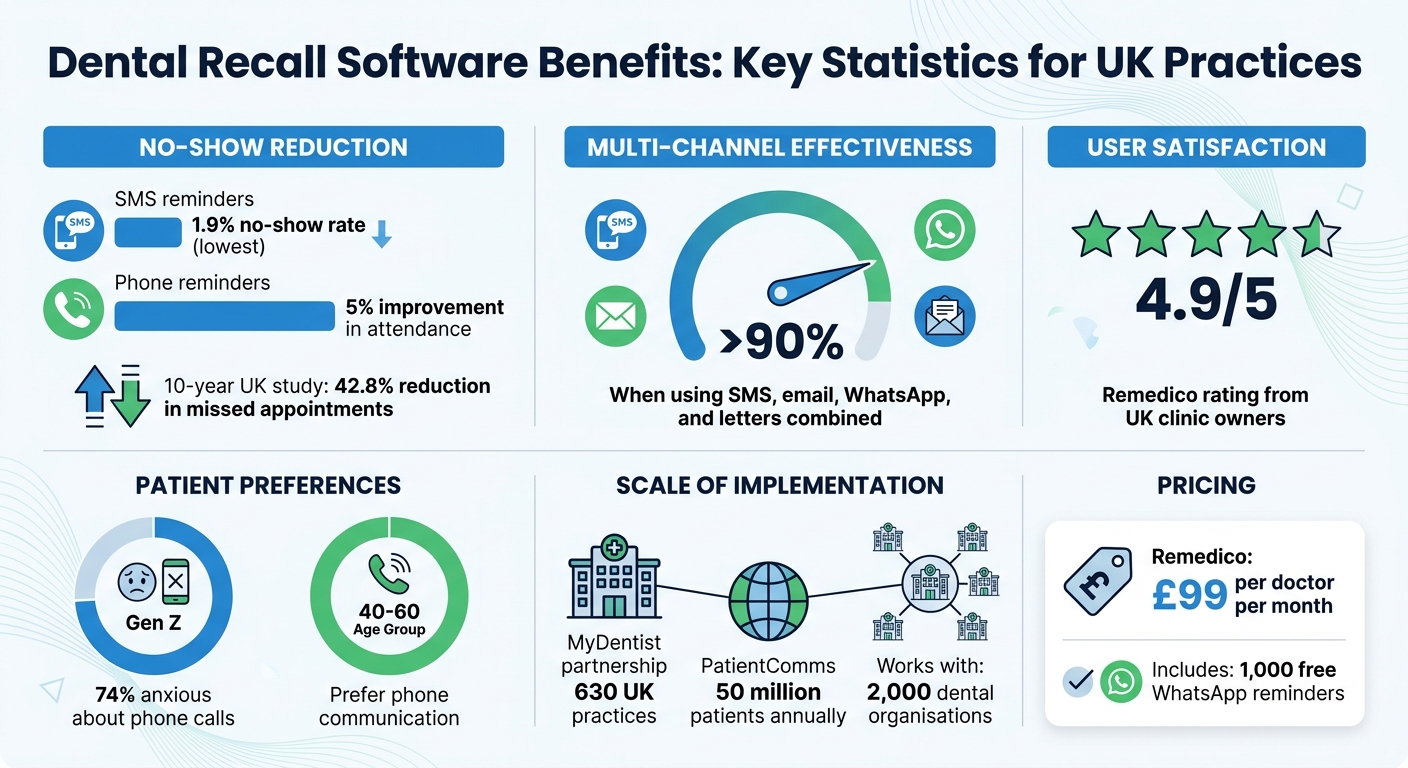
- Lower no-show rates: SMS reminders reduce no-shows to just 1.9%.
- Customised communication: Messages are tailored to age and preferences, improving engagement.
- Time-saving automation: Reduces manual workload for staff by handling recalls, hygiene reminders, and follow-ups.
- Compliance with UK regulations: Ensures GDPR and CQC standards are met.
- Integration with practice systems: Links directly to patient records for seamless scheduling.
Practices using tools like Remedico report higher retention rates and smoother operations, with features like AI-driven follow-ups, direct booking links, and detailed dashboards to track performance. These systems are transforming how UK clinics manage patient care, making it easier to keep schedules full and patients engaged.
@figure {Dental Recall Software Benefits: Key Statistics for UK Practices} :::
What is Dental Recall Software UK Clinics Use for Patient Communication
Dental recall software is designed to simplify and automate the process of following up with patients, from sending recall reminders to booking appointments. By handling routine follow-ups automatically, it reduces the manual workload on staff and ensures patients stay on top of their dental care schedules [4].
This software integrates with your practice management system, pulling patient data to send reminders through multiple channels like SMS, email, WhatsApp, or even physical letters. Many systems include direct booking links to make scheduling easier [3].
Modern platforms also handle overdue reminders, hygiene alerts (e.g., 72-hour and 24-hour notifications), and follow-ups for missed appointments (DNA). Recall intervals can be customised based on the patient’s risk level as assessed by their dentist [4].
“Dental recall automation UK is not about replacing reception. It is about making sure overdue recalls, hygiene reminders, confirmations, and DNA follow‑up happen consistently, even when the front desk is busy.” – Silverstone AI Editorial Team [4]
Between 2021 and 2026, MyDentist partnered with PatientComms to implement a tailored CRM and recall strategy across its 630 UK practices. The goal? To boost patient engagement and retention. PatientComms now serves over 50 million patients and collaborates with 2,000 dental organisations annually, boasting recall automation effectiveness rates above 90% [5].
These systems not only streamline appointment management but also offer a variety of advanced features.
Core Features of Dental Recall Software
One standout feature is the ability to send a series of automated reminders over several days to re-engage patients who may have lapsed, rather than relying on a single message [4]. Real-time dashboards help track the success of these recalls and highlight patients who might be falling behind on their care [3].
Branded SMS messages use “Verified Sender” technology, which displays your practice logo and a blue tick, enhancing trust and minimising the risk of spoofing [6]. Some platforms even incorporate AI to handle tasks like converting voice notes into clinical records or managing appointment assistants [2].
Practices can tailor recall schedules according to patient risk, following guidelines from organisations like NICE and NHS England [4]. Additionally, the software separates service communications (such as care reminders) from marketing messages, helping practices stay compliant with regulations [4].
These features not only keep patients engaged but also ensure that practices adhere to UK data protection and care standards.
Meeting UK GDPR and CQC Requirements
Top providers ensure compliance with UK GDPR through secure cloud hosting on platforms like AWS, safeguarding patient data from unauthorised access [3]. Digital tools, such as forms and document libraries, allow practices to collect and store patient consent electronically, replacing outdated paper systems [3].
Automated dashboards also provide the evidence needed for CQC inspections, demonstrating that a practice is both effective and well-led [5]. For example, Rotherham Doncaster & South Humber Health NHS Trust utilised a custom PatientComms system to streamline reporting on Friends & Family Test (FFT) scores and patient feedback, meeting NHS requirements efficiently [5].
“Under UK rules, a recall reminder or appointment confirmation is generally treated as a service communication rather than direct marketing, provided the message is clearly related to care the patient has already agreed to receive.” – Silverstone AI Editorial Team [4]
The software also tracks patient communication preferences - whether they prefer SMS, email, or phone - to comply with GDPR’s requirements for informed consent and opt-in practices [3]. For procedures like extractions, automated follow-ups ensure patients receive post-operative care instructions, supporting CQC standards for patient safety [1].
sbb-itb-d8b42ea
How Automated Recalls Help Reduce Missed Dental Appointments
Missed appointments can be a major headache for dental practices. They not only disrupt schedules but also impact revenue. Automated recall systems are a game-changer here, sending timely reminders through channels patients actually use. This approach reduces no-shows, keeps your calendar full, and doesn’t pile extra work on your reception team. By maintaining regular contact with patients, these systems enhance both retention and efficiency.
The numbers back this up: SMS reminders have the lowest no-show rate at just 1.9% [1]. This makes sense, especially since around 74% of younger Gen Z patients feel anxious about talking on the phone [1]. Text-based reminders meet patients where they’re most comfortable, making communication more effective.
Cutting Down on No-Shows and Cancellations
The timing of reminders is crucial. Following the 72/24 rule - sending messages 72 hours and 24 hours before an appointment - can significantly boost confirmation rates [4]. This approach gives patients enough time to organise themselves while keeping the appointment fresh in their minds.
Modern systems go beyond simple reminders. They send immediate “Did Not Attend” (DNA) follow-ups right after a patient misses an appointment [4]. These messages prompt patients to reschedule while they’re still engaged. Even phone reminders can increase attendance rates by about 5% [1]. With these tools, practices can create a more connected and responsive patient experience.
Keeping Patients Connected to Your Practice
By reducing missed appointments, automated systems help keep patients engaged with your practice. Regular, automated communication ensures your practice stays on their radar without feeling intrusive. These systems also align with NICE and NHS risk-based guidance, pulling recall intervals from your practice management system instead of relying on generic timelines [4]. This means patients get reminders tailored to their actual clinical needs.
Using a multi-channel recall strategy - combining SMS, email, and WhatsApp - can achieve effectiveness rates of over 90% [5]. A great example of this is MyDentist’s partnership with PatientComms. Between 2021 and 2026, they implemented a tailored CRM and recall strategy across 630 UK practices, serving over 50 million patients annually [5]. MyDentist’s Director of Marketing shared:
“We’ve been working closely with PatientComms for over five years on the development of our overall CRM strategy… I see them as an extension of our Marketing team” [5].
Freeing Up Reception Staff Time
Automation takes the repetitive tasks off your reception team’s plate - like overdue recalls, hygiene reminders, and DNA notifications - so they can focus on patients in the office [4]. Instead of spending hours chasing appointments, staff can handle more complex cases and provide better face-to-face service.
Tools like Remedico’s Retention AI™ send automated reminders and follow-ups to minimise no-shows, while RemedicoGPT™ speeds up admin work by generating reports and filling forms in seconds [2]. Clinics using these tools report a 4.9/5 rating from their teams [2]. Plus, the system offers 1,000 free WhatsApp reminders each month, keeping patients informed through their preferred communication channels.
How to Set Up Dental Recall Software in Your UK Practice
Getting dental recall software up and running doesn’t have to be a long process - UK practices can often go live in just a few weeks. The key steps? Choose the right system, integrate it with your patient records, create workflows tailored to your practice, and track your results to see what works best. Here’s how you can do it.
Step 1: Choose Software That Matches Your Practice’s Needs
Start by evaluating what your practice requires. A small clinic will have different priorities than a multi-site group. Look for software that supports multiple communication channels like SMS, WhatsApp, and email. Why? Different patient demographics prefer different methods. For instance, patients aged 40–60 are more likely to respond to phone calls, while 74% of Gen Z patients feel anxious about them and prefer text-based options like WhatsApp or SMS [1]. Offering a mix of channels can help reduce missed appointments and improve retention.
Ensure the software complies with UK GDPR and PECR regulations [1]. It should also support risk-based recall intervals, aligning with NICE and NHS England guidance. This approach tailors recall schedules to individual patient risks rather than using generic timeframes.
Feature | Why It Matters for UK Practices |
|---|---|
Risk-Based Intervals | Aligns with NICE CG19 and NHS England guidance for patient-specific care |
Automated DNA Follow-up | Quickly re-engages patients after missed appointments |
Service-Only Messaging | Meets ICO PECR standards without requiring marketing consent |
Recall Effectiveness Reports | Helps identify gaps in scheduling and measure ROI |
One option to consider is Remedico, which offers these features for £99 per doctor per month. The package includes 1,000 free WhatsApp reminders, Retention AI™ for automated follow-ups, and RemedicoGPT™ to streamline admin tasks [2]. It’s rated 4.9/5 by UK clinic owners [2].
Step 2: Integrate the Software with Your Patient Records
Once you’ve chosen your software, the next step is integration. Platforms like Remedico and CareStack work as all-in-one systems, linking recall modules directly to clinical records, billing, and charting [2][3]. This means recalls can be triggered automatically - whether it’s after a treatment or when a patient reaches their due date.
If you’re moving from older systems or even Excel spreadsheets, most providers offer assistance to securely migrate your patient data. This process ensures compliance with UK data protection laws and includes transferring patient preferences, treatment histories, and existing recall intervals [2][3].
Make sure your system enables recall messages to include direct booking links. This allows patients to schedule appointments seamlessly, with bookings recorded directly in your calendar [3]. Secure cloud hosting (such as AWS) also ensures you can access data across multiple locations without compromising on security [2].
A UK study spanning 10 years found that integrating automated reminders with practice systems reduced missed appointments by 42.8% [1]. Once your data is synced, you can shift focus to designing effective workflows.
Step 3: Build Recall Workflows That Work
Set clear rules for who qualifies for recalls. Most systems will identify patients with a set recall interval who’ve visited within the past two years. Schedule messages to go out on the same weekday as the patient’s due date, starting four weeks in advance. If no appointment is booked, follow up two weeks later.
For patients with overlapping dental and hygiene recalls, combine the messages. This reduces communication fatigue and cuts costs. Additionally, the software should recognise patients who’ve already booked future appointments to prevent duplicate reminders.
Keep your messages focused on the patient’s health and care plan. Framing them as service-related communications ensures compliance with PECR without needing explicit marketing consent. Avoid promotional language - stick to straightforward reminders like, “Your six-month check-up is due.”
Roll out the system in phases. Start by addressing overdue recalls, then expand to hygiene reminders and DNA reactivations. Allow at least a week after activation for the system to categorise appointments properly before setting workflows to active.
Step 4: Monitor Results and Adjust
Track which messages are getting responses. Most systems include dashboards that show recall conversion rates, pre-booking rates, and revenue retention [1]. Analyse your data by communication channel and age group to understand patient preferences.
Using multiple channels - SMS, email, and letters - can achieve effectiveness rates above 90% [5]. Automate the process by sending recalls in small daily batches. This prevents your reception team from being overwhelmed and ensures a steady stream of bookings.
Remedico’s Owner’s Dashboard provides a clear overview of key metrics, including revenue and performance. It helps you identify which workflows are working and where adjustments are needed [2]. The Patient Flow™ feature tracks every step of a patient’s journey, from their first visit to follow-ups, pinpointing where patients may drop off. Analysing these results allows you to fine-tune your system, keeping patients engaged and your schedule full.
3 Common Mistakes UK Practices Make with Recall Software
Recall software has the potential to significantly cut down on missed appointments, but using it incorrectly can cancel out these benefits. Many UK practices unknowingly lose patients and revenue by falling into avoidable traps. Let’s look at three frequent mistakes and how to steer clear of them.
Ignoring How Patients Want to Be Contacted
Not all patients appreciate being contacted in the same way. Some might prefer a quick text message, while others lean towards emails, phone calls, or even letters through the post. Using the wrong method can render your reminders ineffective, leaving patients to ignore them entirely [4]. When this happens, patients may fall out of routine care or even switch to a competitor [7].
Modern systems like Remedico can handle multiple communication channels, including SMS, WhatsApp, email, and letters. If a patient doesn’t respond to the first message, the software can send a follow-up through a different channel or include a direct booking link to make things easier [4].
To avoid this mistake, take the time to understand and respect each patient’s preferred communication method. This not only boosts the effectiveness of your reminders but also helps maintain patient trust and compliance with regulations.
Breaking UK Data Protection Rules
Recall reminders are classified as service communications, provided they stick to the patient’s care plan. The problem arises when practices include promotional content - like offers on teeth whitening - which turns the message into direct marketing under PECR (Privacy and Electronic Communications Regulations). This requires explicit opt-in consent and can lead to complaints or scrutiny if mishandled [4].
“Under UK rules, a recall reminder or appointment confirmation is generally treated as a service communication rather than direct marketing, provided the message is clearly related to care the patient has already agreed to receive.” - Silverstone AI Editorial Team [4]
Another common misstep is applying a blanket six-month recall interval for everyone. Clinical guidelines from NICE and NHS England stress the importance of using risk-based, personalised intervals [4]. Recall software should pull this information directly from each patient’s clinical record rather than relying on a one-size-fits-all approach. Tools like Remedico integrate with patient records to ensure recall timings are tailored to each individual, keeping your practice compliant and clinically precise [2].
Relying on a Single Reminder
Sending just one reminder is rarely enough to secure an appointment. An automated sequence over ten days can help recover many patients who don’t respond to the initial prompt [4]. Using multiple channels - such as SMS, email, and letters - can push effectiveness rates above 90% [5].
Remedico’s Retention AI™ simplifies this process by automating follow-ups, ensuring your reception team isn’t overwhelmed [2]. Its Owner’s Dashboard provides a clear overview of patient statuses - whether they’re “booked”, “due”, or “overdue” - so you can spot gaps in your follow-up strategy and adjust accordingly [2][7]. This proactive approach turns missed opportunities into confirmed appointments, keeping your schedule full and patients engaged.
Key Takeaways for UK Dental Practices
Dental recall software helps minimise missed appointments by automating follow-ups, especially during busy periods. A concise, targeted reminder sequence can bring back lapsed appointments efficiently [4]. This approach ensures patients stay engaged, reducing the chances of them switching to competitors or seeking new providers online [4].
In addition to automated reminders, adapting recall intervals to individual patient needs is crucial. Risk-based recall intervals outperform the traditional six-month standard. Modern systems integrate recall dates directly from each patient’s clinical record, aligning with NICE and NHS England guidelines [3][4]. This not only supports clinical accuracy but also ensures compliance with CQC standards without adding to administrative workloads.
Using multiple communication channels strengthens patient engagement further. Multi-channel reminders, paired with direct booking links, encourage immediate action, cutting down on the need for manual follow-up [2][3][7]. These direct links make it easier for patients to rebook, streamlining the process for both the practice and its staff [3][7].
A great example of this is Remedico, which offers a comprehensive solution from its expert team. It automates these processes while ensuring compliance with UK GDPR and CQC requirements. With a 4.9/5 rating from clinic owners and staff, it reduces admin burdens and improves rebooking rates [2]. The Owner’s Dashboard provides real-time updates on patient statuses - whether they are “booked”, “due”, or “overdue” - allowing practices to identify gaps and adjust strategies accordingly [2][7].
“Being able to extract and analyse ‘real-time’ data from our practice has helped us make more informed decisions and as a consequence, offer a much better service to our patients.” - Janet Jones, Practice Manager, Inspire Dental [7]
FAQs
How quickly can a UK dental practice set up recall software?
Setting up recall software for a UK dental practice is often a quick process, taking anywhere from a few hours to a few days. With cloud-based systems like Remedico, implementation can sometimes be completed in just one day. The setup generally involves tasks like importing patient data, customising recall schedules, and configuring SMS or email reminders. This streamlined process helps practices enhance patient retention with little to no disruption to their daily operations. :::
Do recall reminders count as marketing under PECR?
Under PECR, recall reminders fall under the category of service communications rather than marketing. This distinction allows them to be sent without needing prior consent, as long as they are directly connected to a service the patient has either requested or is already receiving. :::
How do I choose SMS, WhatsApp or email for patient reminders?
When choosing between SMS, WhatsApp, or email for patient reminders, it’s important to weigh factors like patient preferences, communication effectiveness, and compliance requirements.
- WhatsApp tends to lower missed appointments thanks to its instant messaging nature and higher interaction rates.
- SMS works best for concise, direct updates.
- Email is more appropriate for sharing detailed information.
Combining these channels in a way that aligns with patient needs and adheres to GDPR guidelines can improve engagement and reduce appointment no-shows. :::